

HL7 Integration enables different healthcare systems to exchange patient, clinical, laboratory, radiology, pharmacy, and billing information using standardized formats.
For example, a hospital may use a Hospital Information System (HIS), an Electronic Medical Record (EMR), a Laboratory Information System (LIS), and a Radiology Information System (RIS). HL7 helps these systems communicate so that information can move between them without requiring staff to enter the same data manually into every application.
1. HL7 Integration Hub — The Central Integration Layer
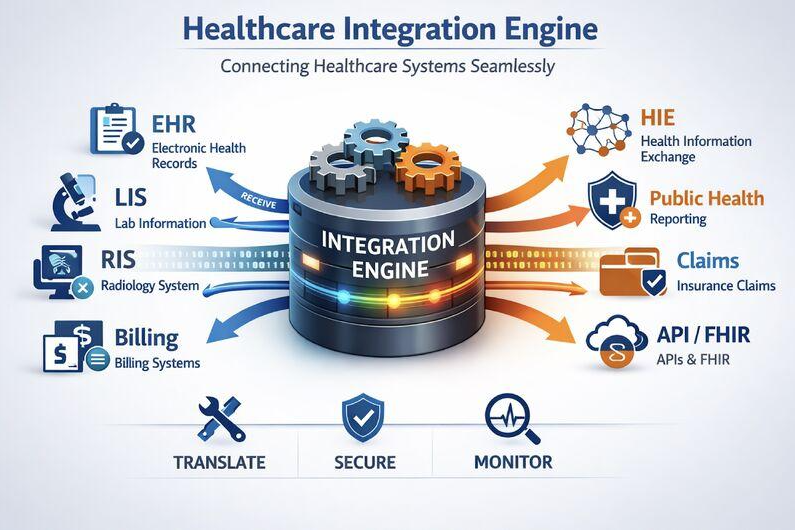
The HL7 Integration Hub is the central layer that receives, processes, and routes messages between healthcare applications.
How it works:
- A user performs an action in a source system, such as registering a patient.
- The source system generates an HL7 message.
- The integration engine receives the message.
- The engine validates the message and applies the required data mapping.
- The message is routed to the appropriate destination system.
- The receiving system may return an acknowledgement indicating whether the message was accepted or rejected.
Important distinction: HL7 is a healthcare messaging standard, not an integration engine itself. The integration engine is software that processes and routes messages according to the configured interfaces.
Healthcare Source Systems
These are the systems that generate or send healthcare information through the integration layer.

1. HIS — Hospital Information System
An HIS manages hospital operations such as patient registration, appointments, admissions, billing, and discharge.
Example: When reception registers a new patient, the HIS can send the patient’s registration details to connected systems.
Common HL7 message: ADT — used for admission, discharge, transfer, and other patient administration events.

2. EMR — Electronic Medical Record
An EMR manages clinical information such as medical history, diagnoses, consultation notes, prescriptions, and treatment plans.
Example: A doctor orders a laboratory test in the EMR. The order is sent to the LIS, and the result can later be returned to the patient’s record.
Common HL7 messages: ORM for orders, ORU for results, and MDM for medical document workflows, depending on the implementation.

3. LIS — Laboratory Information System
An LIS manages laboratory orders, specimen tracking, test processing, and laboratory results.
Example: A doctor orders a CBC test. The LIS receives the order, processes the specimen, and sends the result back to the EMR.
Common HL7 messages: ORM or another supported order message for test orders, and ORU for laboratory results.

4. RIS/PACS — Radiology Information Systems
RIS manages radiology workflows, including scheduling, procedures, and reporting. PACS stores and retrieves medical images such as X-rays, CT scans, and MRI scans.
Example: A doctor orders a CT scan. The radiology department performs the scan, and the radiologist’s report is made available to the EMR.
Common standards and messages: ORM, ORU, and SIU may be used for relevant workflows. DICOM is commonly used for medical imaging exchange.

5. Pharmacy System
A pharmacy system manages prescriptions, medication dispensing, stock, and related pharmacy operations.
Example: A doctor issues a prescription in the EMR. The prescription is transferred to the pharmacy system, where the pharmacist verifies and dispenses the medication.
Relevant HL7 messages: RDE for encoded medication orders and RXA for medication or vaccine administration information in applicable workflows.
Receiving and Connected Systems
These systems receive information from the integration layer or exchange information with other connected applications.

6. EHR — Electronic Health Record
An EHR can consolidate patient information across multiple encounters, departments, or healthcare providers.
Example: Patient information from a connected clinic can be shared with another authorized healthcare system.
The exact distinction between an EMR and an EHR varies by vendor and implementation.

7. Billing System
A billing system manages service charges, invoices, payments, and insurance-related financial workflows.
Example: After a consultation or laboratory service, relevant charge information can be transferred to the billing system through a configured interface.
Common HL7 message: DFT — used for detailed financial transaction workflows. Other standards or APIs may also be required.

8. Patient Portal
A patient portal allows patients to access authorized information such as appointments, laboratory reports, prescriptions, and other healthcare records.
Example: After a laboratory result is verified and released, it can be displayed in the patient’s portal.
A portal may receive data through its backend API rather than consuming HL7 messages directly.

9. Government Health Systems
Government platforms and regional health information exchanges enable authorized healthcare providers to share information according to applicable requirements.
Example: A hospital sends specified clinical information to a regional health information exchange using its approved interface.
HL7 compatibility alone does not guarantee regulatory compliance. The relevant platform’s technical specifications, security controls, and regulatory requirements must also be satisfied.

10. Other Healthcare Applications
This category may include insurance systems, referral platforms, clinical decision-support tools, external laboratories, and third-party healthcare applications.
Example: When a referral is created, relevant patient and encounter information can be transferred to the receiving facility through a supported interface.
4. HL7 Message Types and Codes Explained
The diagram includes the following HL7 codes. Some represent complete message types, while others represent segments within a message.
| Code | Name or purpose | Practical example |
|---|---|---|
ADT | Admission, Discharge, Transfer | Patient registration, admission, or discharge |
ORM | General Order Message | Laboratory or other clinical order |
ORU | Observation Result | Laboratory result or clinical observation |
MDM | Medical Document Management | Clinical document notification or transfer |
OBR | Observation Request segment | Details of a laboratory or diagnostic order |
OBX | Observation/Result segment | A measured value, such as hemoglobin |
SIU | Scheduling Information Unsolicited | Appointment creation or schedule update |
DFT | Detailed Financial Transaction | Service charge or financial transaction |
VXU | Unsolicited Vaccination Record Update | Immunization record update |
RDE | Pharmacy/Treatment Encoded Order | Medication order |
RXA | Pharmacy/Treatment Administration | Medication or vaccine administration record |
Technical note: ADT, ORM, and ORU are message types. OBR and OBX are segments commonly found inside messages. The exact codes and workflows supported depend on the HL7 version and the receiving system’s interface specification.
5. Complete Workflow: Patient Registration to Laboratory Results
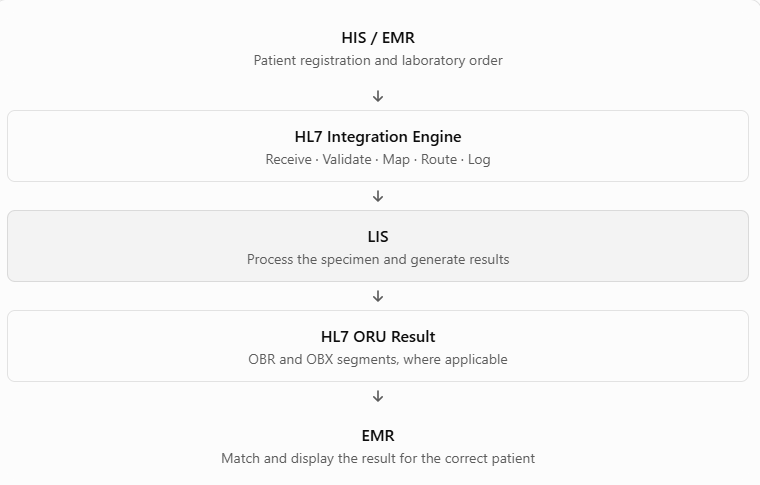
- Step 1 — Patient RegistrationReception registers the patient in the HIS. The record may include the MRN, name, date of birth, and other required demographic details.
- Step 2 — Generate an ADT MessageThe HIS generates an appropriate ADT message, such as
ADT^A04for a patient registration event in a typical HL7 v2 workflow. - Step 3 — Process the MessageThe integration engine receives the message, validates its structure, applies configured mappings, and routes it to the intended system.
- Step 4 — Doctor Orders a Laboratory TestThe doctor orders a CBC test in the EMR. The order is transferred to the LIS using a supported HL7 order message, such as an ORM message in a compatible interface.
- Step 5 — Laboratory Processes the SampleThe LIS receives the order, tracks the specimen, processes the test, and prepares the result.
- Step 6 — Send the ORU ResultThe LIS sends a result message, commonly an ORU message. It may contain an OBR segment for order details and OBX segments for the observations.
- Step 7 — Display the Result in the EMRThe EMR matches the result to the correct patient and order. Following the configured clinical review and release workflow, the result can be made available to the doctor or patient portal.
Simplified data-flow diagram
6. What Does an HL7 Message Look Like?
HL7 v2 messages commonly use a pipe-delimited text format.
Here is a simplified example of a patient registration message:

Explanation of each segment:
MSH— Message Header: Contains the sender, receiver, message type, message identifier, and HL7 version.PID— Patient Identification: Contains patient identifiers and demographic information.PV1— Patient Visit: Contains visit-related information.ADT^A04— Message Type: Represents a patient registration event in this example.MSG001— Message Control ID: A sample identifier used to track the message.
This is an illustrative example, not a production-ready message. Real interfaces require correct field positions, required data, identifiers, encoding, acknowledgement handling, and validation against the receiving system’s specification.
7. Main Benefits of HL7 Integration
Interoperability
Different healthcare systems can exchange information through compatible interfaces.
Reduced Duplicate Data Entry
Automated workflows can reduce the need for staff to enter the same information into multiple systems.
Faster Information Exchange
Orders, results, and administrative updates can be transferred automatically when interfaces are configured correctly.
Better Traceability
Message logs and acknowledgements help technical teams investigate failed or delayed transactions.
Improved Workflow Coordination
HIS, EMR, LIS, radiology, pharmacy, and billing systems can share relevant information more efficiently.
These benefits depend on correct configuration, reliable connectivity, accurate data mapping, and ongoing monitoring.
8. Practical Steps to Implement HL7 Integration
- Identify the systems: List all systems involved, including HIS, EMR, LIS, RIS/PACS, pharmacy, billing, and external platforms.
- Define the workflows: Determine which information needs to move between systems, in which direction, and when.
- Confirm interface specifications: Agree on the HL7 version, message types, trigger events, required segments, and mandatory fields.
- Define patient identity mapping: Establish rules for MRNs, facility identifiers, assigning authorities, and duplicate-patient handling.
- Configure connectivity: Set up the supported transport method, such as MLLP over TCP, an appropriately secured network connection, or an API.
- Configure data mapping and validation: Map source codes and fields to destination values and validate required data.
- Handle acknowledgements and errors: Configure ACK processing, retries, duplicate-message detection, error queues, and recovery procedures.
- Test the interface: Test successful transactions as well as missing MRNs, duplicate patients, invalid codes, delayed results, and network failures.
- Implement security and auditing: Apply access controls, suitable encryption, audit logging, and applicable privacy requirements.
- Monitor after go-live: Track failed messages, queue backlogs, latency, and interface availability. Define who is responsible for support.
9. HL7 vs. FHIR vs. DICOM
These standards support different healthcare integration requirements.
| Standard | Primary purpose | Example |
|---|---|---|
| HL7 v2 | Messaging between hospital systems | Patient registration, orders, laboratory results, scheduling |
| HL7 FHIR | Modern healthcare data exchange using structured resources and commonly REST APIs | An application retrieving patient or appointment information |
| DICOM | Medical imaging and related imaging workflows | Transferring CT, MRI, and X-ray images |
These standards are not necessarily alternatives to one another. A hospital can use HL7 v2 for laboratory interfaces, FHIR for modern application APIs, and DICOM for medical imaging.
10. Applying HL7 Integration to HealthCluster
For HealthCluster HIS and EMR, a typical integration project could involve connecting the platform to an external LIS, RIS/PACS, pharmacy, billing system, or government health platform.
Before implementation, confirm the following:
- Which HL7 versions and message types are supported by both systems?
- Which system is the source of truth for patient MRNs and demographics?
- How are laboratory orders, results, and status updates mapped?
- How are duplicate messages and failed transactions handled?
- Does the receiving platform require HL7 v2, FHIR, DICOM, or a proprietary API?
- What security, audit, and regulatory requirements apply?
